Stick Controls
In addition to being able to access INAV settings through INAV configurator, the settings can be changed with a radio without the need for Configurator.
Arming
When armed, the aircraft is ready to fly and the motors will spin when throttle is applied. With multirotors, the motors will spin at a slow speed when armed (this feature may be disabled by setting MOTOR_STOP, but for safety reasons, that is not recommended).
Arming and disarming is done using a switch, set up on the modes page. (NOTE: Stick arming was removed in INAV 2.2)
Arming Override
Arming is disabled when Nav modes are configured and no GPS lock is available or if a waypoint mission is loaded but the first WP is farther than the nav_wp_max_safe_distance setting.
This Arming block can be bypassed if need be by setting nav_extra_arming_safety to ALLOW_BYPASS and moving the Yaw stick to the high position (usually full right rudder) when the Arm switch is used. This bypasses GPS Arm blocking pre INAV 4.0.0 and both GPS and "First WP too far" Arm blocking from INAV 4.0.0.
Stick Positions
The three stick positions are:
| Position | Approx. Channel Input |
|---|---|
| LOW | 1000 |
| CENTER | 1500 |
| HIGH | 2000 |
The stick positions are combined to activate different functions:
| Function | Throttle | Yaw | Pitch | Roll |
|---|---|---|---|---|
| Control Profile 1 | LOW | LOW | CENTER | LOW |
| Control Profile 2 | LOW | LOW | HIGH | CENTER |
| Control Profile 3 | LOW | LOW | CENTER | HIGH |
| Battery profile 1 | HIGH | LOW | CENTER | LOW |
| Battery profile 2 | HIGH | LOW | HIGH | CENTER |
| Battery profile 3 | HIGH | LOW | CENTER | HIGH |
| Calibrate Gyro | LOW | LOW | LOW | CENTER |
| Calibrate Acc | HIGH | LOW | LOW | CENTER |
| Calibrate Compass/Zero Yaw | HIGH | HIGH | LOW | CENTER |
| Trim Acc Left | HIGH | CENTER | CENTER | LOW |
| Trim Acc Right | HIGH | CENTER | CENTER | HIGH |
| Trim Acc Forwards | HIGH | CENTER | HIGH | CENTER |
| Trim Acc Backwards | HIGH | CENTER | LOW | CENTER |
| Save current waypoint mission | LOW | CENTER | HIGH | LOW |
| Load current waypoint mission | LOW | CENTER | HIGH | HIGH |
| Unload waypoint mission | LOW | CENTER | LOW | HIGH |
| Increase WP mission index | LOW | CENTER | CENTER | HIGH |
| Decrease WP mission index | LOW | CENTER | CENTER | LOW |
| Bypass Nav Arm disable | LOW | HIGH | CENTER | CENTER |
| Save setting | LOW | LOW | LOW | HIGH |
| Enter OSD Menu (CMS) | CENTER | LOW | HIGH | CENTER |
| Enter Camera OSD(RuncamDevice) | CENTER | HIGH | CENTER | CENTER |
| Exit Camera OSD (RuncamDevice) | CENTER | LOW | CENTER | CENTER |
| Confirm - Camera OSD | CENTER | HIGH | CENTER | CENTER |
| Navigation - Camera OSD | CENTER | CENTER | * | * |
For graphical stick position in all transmitter modes, check out this page.
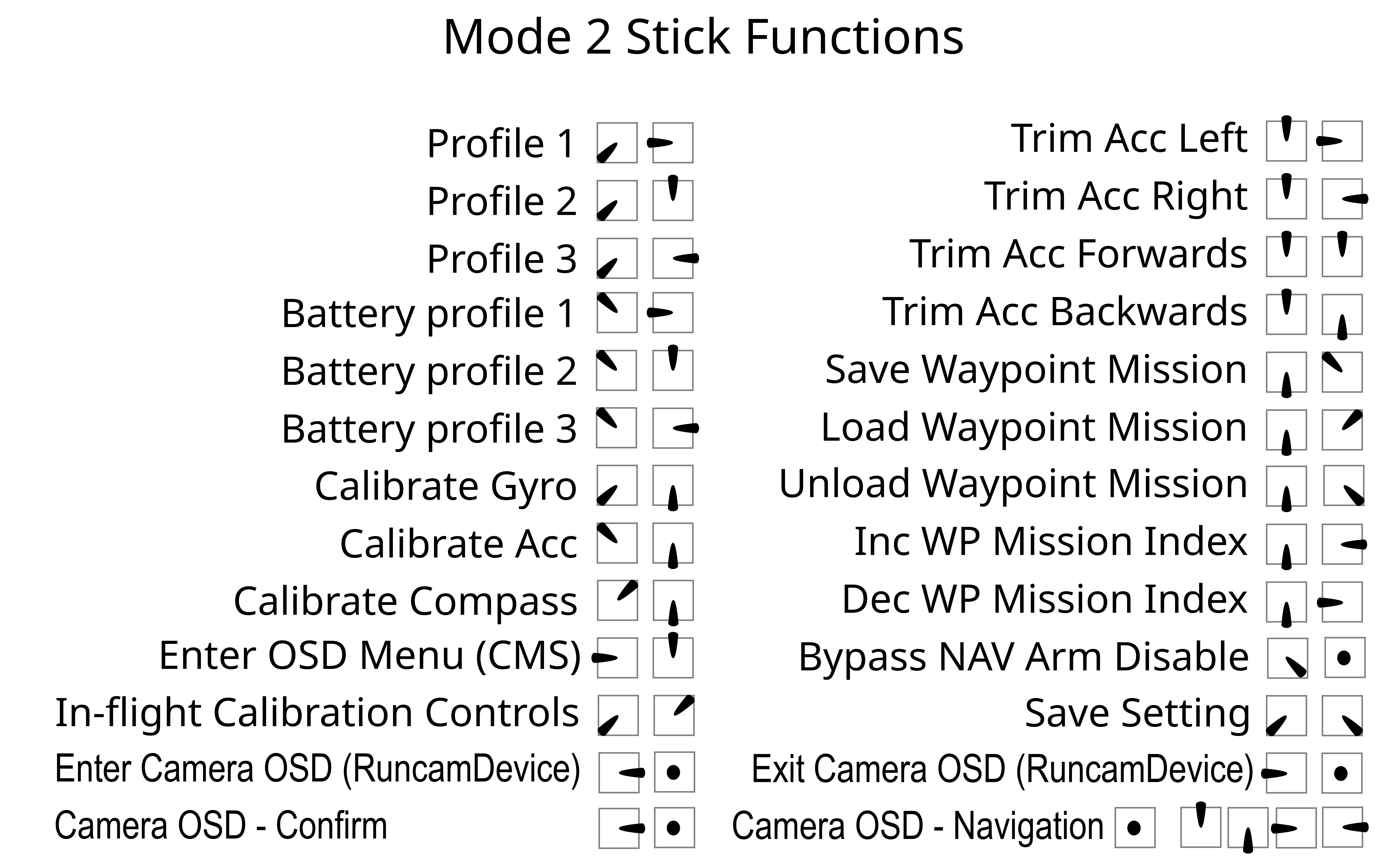
Compass Calibration and Yaw Zero Reset
The stick function Calibrate Compass/Zero Yaw provides 2 functions depending on whether or not a compass is available.
If a compass is available the stick function initiates the compass calibration routine.
If no compass is available the stick function will reset the current yaw/heading estimate to zero (North) and also set the heading as trusted. This is useful on multirotors, allowing the craft yaw/heading to be correctly aligned to actual North simply by physically pointing the craft North then using the stick function to zero the yaw estimate. Since this also sets the heading as trusted Nav modes reliant on heading will be available immediately after arming without the need to fly fast enough to obtain a valid heading from GPS ground course.
Yaw Control
While arming/disarming with sticks, your yaw stick will be moving to extreme values.
To prevent your craft from trying to yaw during arming/disarming while on the ground, your yaw input will not cause the craft to yaw when the throttle is LOW (i.e. below the min_check setting).
For tricopters, you may want to retain the ability to yaw while on the ground, so that you can verify that your tail servo is working correctly before takeoff.
You can do this by setting tri_unarmed_servo to 1 on the CLI (this is the default).
If you are having issues with your tail rotor contacting the ground during arm/disarm, you can set this to 0 instead. Check this table to decide which setting will suit you:
| Is yaw control of the tricopter allowed? | ||||
|---|---|---|---|---|
| Disarmed | Armed | |||
| Throttle low | Throttle normal | Throttle low | Throttle normal | |
| tri_unarmed_servo = 0 | No | No | No | Yes |
| No | No | No | Yes | |
| tri_unarmed_servo = 1 | Yes | Yes | Yes | Yes |
| Yes | Yes | Yes | Yes | |
Throttle Settings and Their Interaction
Terminology. After INAV 2.3, the setting min_throttle was replaced with throttle_idle which is more appropriate to modern hardware.
In this document min_throttle may be taken as either the older min_throttle value, or the throttle value calculated from the modern throttle_idle setting.
The way that throttle_idle generates a throttle value is described in Cli.md.
min_command -
With motor stop enabled this is the command sent to the esc's when the throttle is below min_check or disarmed.
With motor stop disabled, this is the command sent only when the copter is disarmed.
This must be set well below motors spinning for safety.
min_check -
With switch arming mode is in use, lowering your throttle below min_check will result in motors spinning at throttle_idle (min_throttle).
When using the default stick arming, lowering your throttle below min_check will result in motors spinning at min_throttle and yaw being disabled so that you may arm/disarm.
With motor stop enabled, lowering your throttle below min_check will also result in motors off and the esc's being sent min_command.
Min_check must be set to a level that is 100% reliably met by the throttle throw.
A setting too low may result in a dangerous condition where the copter can’t be disarmed.
It is ok to set this below throttle_idle (min_throttle) because the FC will automatically scale the output to the ESCs
throttle_idle (previously min_throttle) -
Typically set to just above reliable spin up of all motors.
Sometimes this is set slightly higher for prop stall prevention during advanced maneuvers or sometimes considerably higher to produce a desired result.
When armed with motor stop off, your motors will spin at this command so keep that in mind from a safety stand point.
max_check -
Throttle positions above this level will send max_command to the ESCs.
max_throttle -
This is the max command to the ESCs from the flight controller.