Optical Flow and Rangefinder
This guide explains how to use optical flow sensors and rangefinders (LIDAR/SONAR) with INAV and to enable terrain following and GPS-free position hold.
Overview
Rangefinders (LIDAR/SONAR) measure altitude above ground level (AGL), while optical flow sensors track horizontal movement by analyzing the ground below. When used together, they enable:
- Terrain following - Maintain constant height above ground using Surface mode
- GPS-free position hold - Hold position indoors or in GPS-denied areas (multirotor only)
- Improved landing detection - More accurate landing for multirotors and fixed wings
Optic flow and rangefinders are most commonly used with Surface mode, which modifies altitude-controlled flight modes to follow terrain contours instead of maintaining absolute altitude.
Supported Hardware
Rangefinder (LIDAR/SONAR) Sensors
| Type | Model | Range | Connection | Notes |
|---|---|---|---|---|
| Laser (ToF) | VL53L0X | 0-75cm | I2C | Most common, inexpensive |
| Laser (ToF) | VL53L1X | 0-400cm | I2C | Extended range version |
| Laser (ToF) | TOF10120 | 0-200cm | I2C | Compact and lightweight |
| Laser (ToF) | TeraRanger Evo | 30-600cm | I2C/UART | Professional grade, various models |
| Ultrasonic | SRF10 | 0-600cm | I2C | Legacy support |
| Ultrasonic | US42 | 0-645cm | I2C | Maxbotix sensor |
| Radar | NanoRadar NRA15/NRA24 | 0-200m | UART | Long range, experimental |
| Serial/MSP | MSP Protocol | Varies | UART/MSP | External sensors via companion computer |
| Serial | Benewake (TFmini, etc.) | Varies | UART | Popular LIDAR modules |
Not Supported: HC-SR04 and US-100 ultrasonic sensors are NOT supported.
Optical Flow Sensors
| Type | Model | Features | Connection | Notes |
|---|---|---|---|---|
| PixArt | PMW3901-based (CXOF) | Motion tracking chip | SPI/I2C | Common in flight controllers |
| MSP Protocol | External via companion | Custom solutions | UART/MSP | Requires external processor |
Setup Guide
1. Hardware Installation
Rangefinder Mounting:
- Mount facing straight down from the aircraft
- Keep away from propeller wash turbulence
- Clear field of view to ground (no obstructions)
- Typical mounting: bottom center of frame
Optical Flow Mounting:
- Mount facing straight down
- Should be level with rangefinder
- Needs clear view of ground texture
- Works best 10cm-3m above ground
2. Configuration
Enable Rangefinder
In INAV Configurator → Configuration Tab:
- Set
rangefinder_hardwareto your sensor type (e.g.,VL53L0X) - Save and reboot
CLI Settings:
# Select your rangefinder hardware
set rangefinder_hardware = VL53L0X

# Optional: Enable median filtering for smoother readings
set rangefinder_median_filter = ON

# Maximum altitude for rangefinder use (in cm, default 200cm = 2m)
set inav_max_surface_altitude = 200

# Rangefinder weight in altitude estimation (default 3.5)
set inav_w_z_surface_p = 3.5

# Rangefinder weight in climb rate estimation (default 6.1)
set inav_w_z_surface_v = 6.1

# Save settings
save
Enable Optical Flow (Optional)
CLI Settings:
# Select your optic flow hardware
set opflow_hardware = CXOF

# Scale factor for your specific module (default 10.5)
set opflow_scale = 10.5

# Alignment (default CW0FLIP - depends on mounting)
set align_opflow = CW0FLIP

# Optic flow weight in horizontal position estimation
set inav_w_xy_flow_p = 1.0

# Optic flow weight in horizontal velocity estimation
set inav_w_xy_flow_v = 2.0

# Save settings
save
3. Calibration
Rangefinder Calibration
Rangefinders typically require no calibration. Verify operation:
- Connect to INAV Configurator
- Observe sensor readings in the Sensors tab
- Move aircraft up/down to verify readings change appropriately
Optical Flow Calibration
In INAV Configurator → Calibration Tab:
- Connect your aircraft to INAV Configurator
- Go to the Calibration Tab
- Place aircraft on a flat, stable surface
- Click "Calibrate Optic Flow"
- Aircraft must remain stationary for ~30 seconds during auto-calibration
- Verification: Settings
accgain_x,accgain_y,accgain_zshould NOT be 4096
Verification (CLI): After calibration, verify these settings have changed from defaults:
opflow_scaleshould be adjusted from the default 10.5- Hardware-specific calibration values should be stored
If calibration fails or optic flow isn't working correctly, see the Optic Flow and Rangefinder Troubleshooting section.
Using Surface Mode
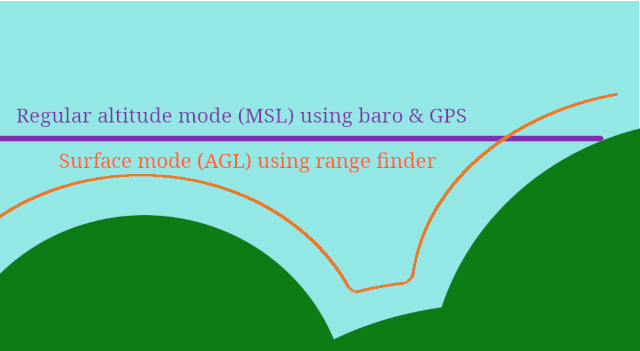
Surface mode enables terrain following - which is where the aircraft maintains a constant altitude above ground instead of absolute altitude. This is the primary use case for rangefinders.
Platform Support
- ✅ Multirotors: Full support with all altitude-holding modes
- ❌ Fixed Wing: Surface mode NOT available (barometric altitude only)
Compatible Flight Modes (Multirotors)
Surface mode can be combined with these altitude-controlled modes:
| Mode | Without SURFACE | With SURFACE Enabled |
|---|---|---|
| ALTHOLD | Maintains absolute altitude (barometric) | Maintains height above ground (terrain following) |
| POSHOLD | Holds 3D position with absolute altitude | Holds 2D position with terrain-relative altitude |
| CRUISE | Velocity control with absolute altitude | Velocity control with terrain-relative altitude |
Throttle Stick Behavior in Surface Mode
When Surface mode is active:
- Throttle stick controls altitude above ground (AGL)
- Stick range: 0 to
nav_max_terrain_follow_alt(default 100cm) - Example: With default settings, full throttle = 1 meter above ground
- Mid-throttle = ~50cm above ground
Important: Adjust nav_max_terrain_follow_alt based on your rangefinder's reliable range.
Enabling Surface Mode
- Go to Modes tab in configurator
- Add SURFACE mode
- Assign to an AUX channel switch
- Save
Recommended Setup:
# Set maximum terrain following altitude (in cm)
# Should be less than your rangefinder's max reliable range
set nav_max_terrain_follow_alt = 100

# Save
save
Surface Mode Configuration
Key Settings:
| Setting | Default | Range | Description |
|---|---|---|---|
nav_max_terrain_follow_alt | 100cm | 0-1000cm | Maximum altitude above ground in Surface mode |
inav_max_surface_altitude | 200cm | 0-1000cm | Maximum rangefinder range to use for surface tracking |
inav_w_z_surface_p | 3.5 | 0-100 | Weight of rangefinder in altitude estimation (higher = more responsive) |
inav_w_z_surface_v | 6.1 | 0-100 | Weight of rangefinder in climb rate estimation |
Tuning Tips:
inav_w_z_surface_ptoo high: Oscillation, sensitive to rangefinder noiseinav_w_z_surface_ptoo low: Slow response to terrain changes- Start with defaults and adjust gradually
GPS Free Position Hold with Optical Flow
Prerequisites:
- Rangefinder installed and working
- Optical flow sensor installed and calibrated
- Both sensors enabled in configuration
How It Works:
- Optical flow detects horizontal movement relative to ground
- Rangefinder provides altitude for flow calculations
- Together they estimate X/Y position and velocity
- POSHOLD mode uses this to maintain position without GPS
Limitations:
- Works best 10cm-3m above ground
- Requires textured ground surface (grass, carpet work well; smooth floors don't)
- Position estimate drifts over time (no absolute reference)
- GPS will override flow if available
Configuration:
# Enable optic flow for position estimation
set opflow_hardware = CXOF

# Flow weight settings (adjust for your setup)
set inav_w_xy_flow_p = 1.0   # Position weight
set inav_w_xy_flow_v = 2.0   # Velocity weight

# Enable rangefinder for altitude reference
set rangefinder_hardware = VL53L0X
set inav_max_surface_altitude = 300  # 3m max range

save
Troubleshooting
Rangefinder Issues
Problem: No rangefinder readings in configurator
- Check I2C/UART connection and wiring
- Verify correct
rangefinder_hardwareselection - Ensure sensor has power (3.3V or 5V depending on model)
- Check for conflicting I2C devices (same address)
Problem: Erratic altitude readings
- Enable
rangefinder_median_filter = ON - Check for propeller wash affecting sensor
- Ensure sensor is mounted rigidly (no vibration)
- Verify clear line of sight to ground
Problem: Surface mode not working
- Verify rangefinder readings are valid in Sensors tab
- Check
inav_max_surface_altitudeis appropriate for your sensor - Ensure aircraft is within rangefinder range
- Multirotor only - fixed wings don't support Surface mode
Optical Flow Issues
Problem: No optic flow data
- Verify SPI/I2C connection
- Check
opflow_hardwaresetting matches your sensor - Ensure sensor has clear view of ground
- Check alignment setting
align_opflow
Problem: Position drift in GPS-free POSHOLD
- Calibrate optical flow sensor
- Verify rangefinder is working (flow needs altitude reference)
- Ensure ground has visible texture (patterns, grass, etc.)
- Flow works poorly over smooth/uniform surfaces
- Check
opflow_scalecalibration
Problem: "Toilet bowling" or circling
- This usually indicates compass calibration issues, not optic flow
- Recalibrate compass following Compass calibration
- Ensure compass is away from magnetic interference
Safety Warnings
⚠️ Important Safety Information:
- Test altitude limits: Always verify your rangefinder's reliable range before flying
- Failsafe behavior: If rangefinder signal is lost, aircraft will slowly descend
- Terrain clearance: Set
nav_max_terrain_follow_altconservatively (under rangefinder max range) - Environmental factors:
- Rangefinders may give false readings over water or reflective surfaces
- Optic flow requires textured ground surface
- Very low or very high altitude reduces accuracy
- Fixed wing limitation: Surface mode is NOT available for fixed wings
- Indoor flight: GPS-free position hold requires good lighting for optical flow
Advanced: Position Estimator Weights
INAV uses a sensor fusion algorithm that combines multiple sensors. You can adjust how much each sensor influences the position estimate.
Surface/Rangefinder Weights:
set inav_w_z_surface_p = 3.5    # Altitude position weight
set inav_w_z_surface_v = 6.1    # Altitude velocity weight
Optical Flow Weights:
set inav_w_xy_flow_p = 1.0      # Horizontal position weight
set inav_w_xy_flow_v = 2.0      # Horizontal velocity weight
General Principle:
- Higher weight = more influence from that sensor
- Lower weight = less influence, more from other sensors (GPS, barometer, etc.)
- Increase weights if sensor is accurate and reliable
- Decrease weights if sensor is noisy or unreliable
Examples and Use Cases
Example 1: Basic Terrain Following (Multirotor)
Goal: Fly over uneven terrain maintaining constant ground clearance
Setup:
- Install VL53L0X rangefinder (I2C)
- Configure:
set rangefinder_hardware = VL53L0X - Set terrain follow limit:
set nav_max_terrain_follow_alt = 100 - Enable Surface mode on a switch
Flight:
- Arm in ANGLE mode
- Enable ALTHOLD mode
- Toggle Surface mode ON
- Throttle stick now controls height above ground (0-100cm)
- Fly over terrain - aircraft follows ground contours
Example 2: Indoor GPS-Free Position Hold
Goal: Stable hover indoors without GPS
Setup:
- Install VL53L0X rangefinder + CXOF optical flow sensor
- Configure both sensors in CLI
- Enable Surface mode + POSHOLD mode switches
Flight:
- Find area with textured floor/ground
- Arm and hover in ANGLE mode
- Enable POSHOLD mode
- Enable Surface mode
- Release sticks - aircraft holds position using optic flow
- Note: Position will drift slowly over time (no GPS reference)
Example 3: Automated Landing with Rangefinder
Goal: Smooth automated landing for multirotor
Setup:
- Install rangefinder
- Configure:
set rangefinder_hardware = VL53L0X - Set landing detection:
set nav_disarm_on_landing = ON
Behavior:
- RTH landing uses rangefinder for precise altitude control
- Landing detection activates when rangefinder shows ground contact
- Automatic disarm on touchdown
Related Documentation
- Navigation PID tuning MC - More Rangefinder and Optical flow related information
- Modes - All flight modes including SURFACE
- Navigation Modes - ALTHOLD, POSHOLD, CRUISE
- Settings - Complete CLI settings reference
Frequently Asked Questions
Q: Can I use Surface mode with fixed wings? A: No, Surface mode is only available for multirotors. Fixed wings use barometric / GPS altitude only.
Q: Do I need GPS if I have optic flow? A: No, but optic flow position estimates drift over time without an absolute reference. GPS provides that reference for long-term accuracy. You DO need a compass for yaw / heading measurement.
Q: What's the maximum rangefinder range I should use?
A: Set inav_max_surface_altitude to your sensor's reliable range, not maximum range. For VL53L0X, use 50-60cm even though it can read up to 75cm under ideal conditions (white tile floor, indoors).
Q: Can I combine Surface mode with waypoint missions? A: Surface mode is designed for manual flight modes (ALTHOLD, POSHOLD, CRUISE). Waypoint missions use absolute altitude from barometer/GPS.
Q: My rangefinder readings jump around - how do I fix this?
A: Enable median filtering: set rangefinder_median_filter = ON. Also check for vibration and ensure sensor has clear view to ground.
Technical Details
For developers and advanced users, see the technical implementation documentation:
- Rangefinder Hardware Support
- Source code:
src/main/sensors/rangefinder.candsrc/main/sensors/opflow.c - Position estimator:
src/main/navigation/navigation_pos_estimator_*.c