Fixed Wing Autolaunch
INAV's auto launch is intended to provide assistance for launching the fixed-wing UAVs. Launch detection works by monitoring airplane acceleration - once it breaches the threshold for a certain amount of time launch sequence is started. This detection should happen due to a thrown release or a launch system, such as a bungee launch. Do not fake throw, or "shake and bake", your airplane to start the motor prematurely. If powered assistance is needed, use the idle idle throttle settings to assist. Gliders have different needs than motorised planes. See below for advice on a glider launch setup.
NAV LAUNCH mode is based on Angle mode, so it will try and stabilise plane.
It will target zero roll, zero yaw and the predefined climb angle.
The I-gain of the PIFF regulator is also disabled to prevent I-gain growing during launch until motor is started.
When a successful launch has been activated, it waits for preconfigured amount of time before starting motor.
NAV LAUNCH is automatically aborted in these following conditions:
- After a timeout in seconds (default of 5 seconds)
- By exceeding an altitude (default to off)
- By any pilot input on PITCH/ROLL stick. When it has aborted it goes to whichever mode is selected. This can be Angle, Acro, Horizon, RTH or a waypoint mission (if no other mode is selected it will go to Acro mode).
It's safe to keep NAV LAUNCH activated during flight after the launch has been completed.
NAV LAUNCH has a flight speed check.
If accidental disarm occurs, the user is given 5 seconds to rearm before NAV LAUNCH becomes active again.
See the INAV CLI Settings document for all available parameters, they start with nav_fw_launch.
The most used settings for launch mode can be found on the Advanced Tuning page in INAV Configurator.
Enabling Autolaunch
By default, autolaunch is disabled. You need to tell INAV that you want to use it. There are two ways to do this:
- Manually activate as a switched mode
- Automatically activate by permanently enabling it
Whichever you choose is a personal preference. The switch gives you more control. Having it permanently enabled means it will work all the time, but if you don't want to use it, you must remember to move the pitch or roll stick to deactivated it.
Autolaunch Enabled By a Switch

To use a switch, you will need to set a switch to a channel on your transmitter. Then in the Modes page in INAV Configurator, set NAV LAUNCH mode to be active when the switch is in the chosen position. If you don't see the NAV LAUNCH mode, you may have the permanent method enabled.
Autolaunch Permanently Enabled
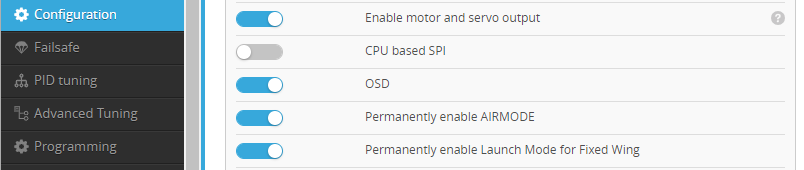
To have Autolaunch permanently enabled, activate the Permanently enabled Launch Mode for Fixed Wing feature on the Configuration page. If this is enabled, the NAV LAUNCH mode will not be found on the Modes page.
Using Autolaunch
There are many versions of how to use autolaunch floating about the internet. Here is the official procedure for using autolaunch:
Activate Autolaunch Sequence
- In preparation for launch, make sure that you are not in a navigation mode, or a modifier (such as alt hold) that activates auto throttle.
- If you don't have autolaunch permanently enabled, enable
NAV LAUNCHwith the switch on your transmitter. - Arm the airplane.
- Select the mode that you would like to exit launch in to. A good choice for this is position hold, as you can watch the aircraft through the launch and keep it in view when it completes.
- Raise the throttle to the approximate level that you want after launch has completed.
- Depending on idle throttle and delay settings,
** READY TO LAUNCH **will appear in the OSD signaling it is ready to be thrown and execute autolaunch.
See below for behavior when common delay and throttle settings are changed.
Common Autolaunch Variations
Currently, you cannot exit launch in to a waypoint mission.
With No Idle Throttle Set
This is the default behavior.
With this configuration, the airplane should be ready to throw.
You can check in the OSD for the system message ** READY TO LAUNCH **.
Throw the airplane and it will enter the launch procedure.
You should not shake the aircraft to falsely start the launch!
Idle Throttle Set With no Idle Throttle Delay
The motor will start with the Idle Throttle.
** READY TO LAUNCH** will be shown on the OSD.
Throw the airplane and it will enter the launch procedure.
Idle Throttle set with an Idle Throttle Delay
For the length of the Idle Throttle Delay, nothing will happen.
The OSD will show ** WAITING FOR IDLE **.
Then, the motor will start with the Idle Throttle and show ** READY TO LAUNCH ** on the OSD.
Throw the airplane and it will enter the launch procedure.
Above, I have mentioned text being shown in the OSD to explain the launch status. To see these, you must have the System Messages OSD element on your OSD layout. We highly recommend having System Messages on every OSD layout as it will show useful information and warnings during your flight.
The Launch Procedure
- After throwing the airplane, INAV will watch for triggers to determine it has been launched.
The two main triggers are the
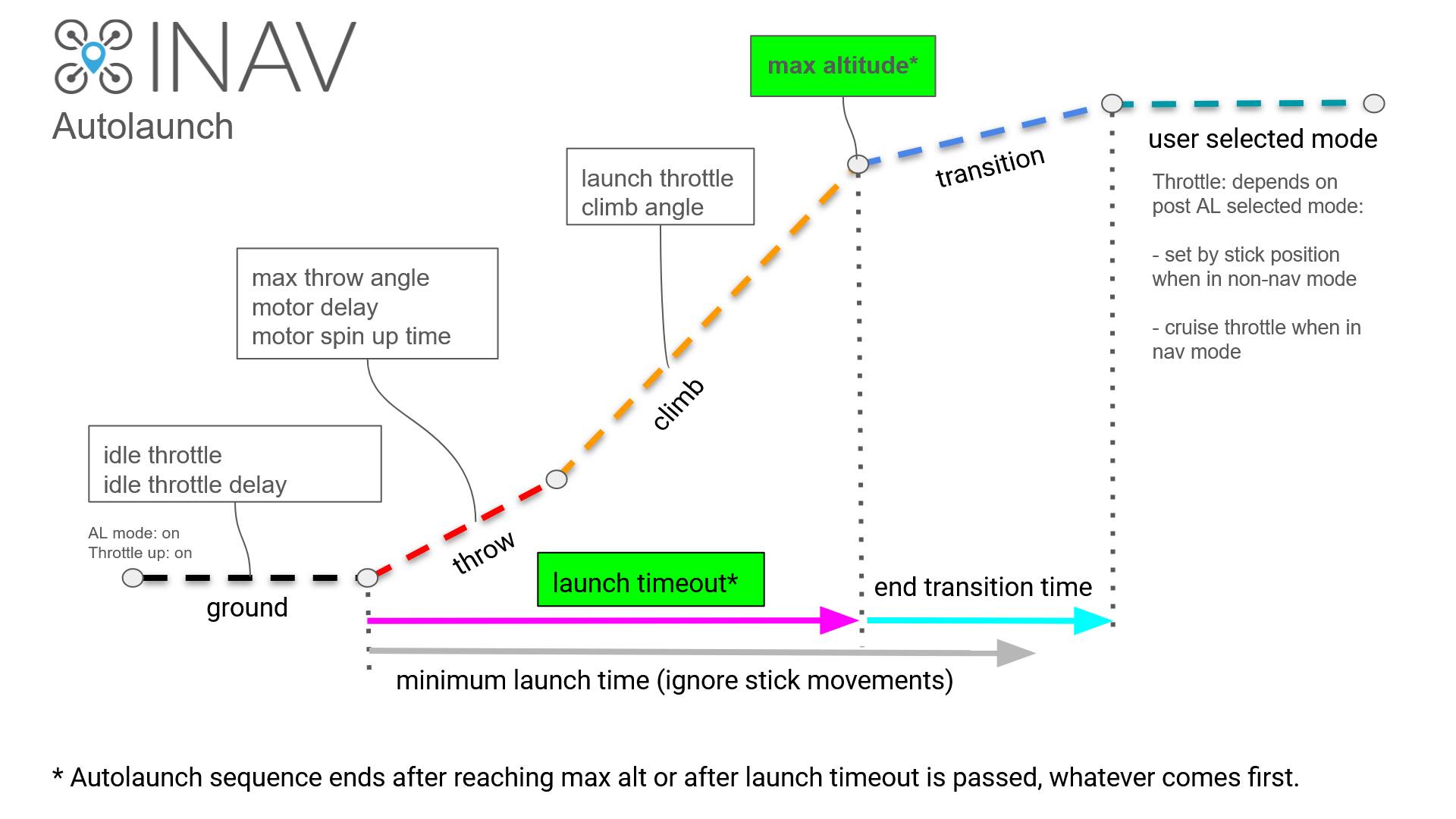
nav_fw_launch_accelandnav_fw_launch_detect_time. Once these have been breached, launch progresses to the next stage. A second trigger is the GPS. If INAV detects the craft moving away from the arming point, it will progress to the next stage of launch. - The throttle will increase from its current level to Launch Throttle over the course of Motor Spinup Time. The pitch of the airplane will be commanded to target Climb Angle plus Fixed Wing Level Trim.
- The airplane will climb with these settings until either the Launch Timeout or Maximum Altitude have been surpassed.
- Launch will transition into the flight mode and throttle level selected on your transmitter over the course of End Transition Time.
Configuring Autolaunch
The basic settings for Autolaunch can be found on the Advanced Tuning page in INAV Configurator. These settings should be all that you need to change to get launch mode working well for your model.
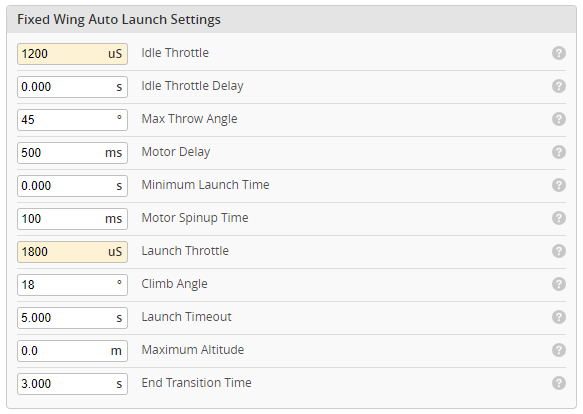
The Autolaunch settings on the Advanced Tuning page are ordered in the way they happen during the launch. So they start with Idle Throttle (the first part of launch mode to activate, if set) to the End Transition Time (the end of the launch). This graphical explanation shows the Autolaunch sequence, related parameters and events is provided.
We will look at these setting briefly.
Autolaunch Video
Idle Throttle
The Idle Throttle setting allows you to let the motor spin at the desired throttle level before you throw the airplane. This can be useful if:
- you have a large or heavy aircraft that will benefit from some additional push
- your plane suffers from torque roll
- you would like a visual indicator that the aircraft is ready to launch
Idle throttle is an extremely useful setting for launch assistance. You can have idle throttle set low, to show you that your aircraft is ready to launch, or you can set it higher to assist with the launch itself. There are often times that people have been seen jerking their airplane before launch, sometimes called a "shake and bake", which is completely unnecessary with INAV. Even Joshua Bardwell has been guilty of this on one of his instructional videos. You're gonna learn something today. With a correctly set up launch detection and idle throttle, you never need to shake and bake. In fact, we advise against it. Using auto launch correctly will be more consistent and safer.
The amount of Idle Throttle you need depends on your goal. If you only want a visual indicator, a low value like 1100uS (10%) will work for you. However, if you want to have some launch assistance or to combat torque roll, you will need to estimate and adjust this value until it works well for your aircraft. A good starting point may be half the launch throttle, which we will cover later. If you don't want to use Idle Throttle, set the value to 1000uS (0%).
nav_fw_launch_idle_thr will set the throttle level for the motor when idle throttle is enabled.
If you just want this as a low, visual aid for launch mode.
You can set this to somewhere between 1050 and 1200.
It should be high enough that the motor spins, but only just.
If you want assistance in launching your aircraft, the idle throttle should be set high enough to assist with the push, but not so high that it is uncontrollable in your hands.
This will very much be dependent on your aircraft, motor, prop, even how you hold it, so you will need to experiment or use the tool at the bottom of this page for an estimate.
The default setting is 1000; which is idle throttle is disabled.
If you don't change anything else, the motor will start spinning at idle throttle as soon as you raise the throttle in the activate launch sequence. However, we don't necessarily want this. Maybe you have a large model that needs two hands that you need to pick it up after you have finished on your transmitter. There are definitely scenarios where you will want to delay the idle throttle from starting. There are a couple of way of doing this. One may suit your situation better.
If you see a red box around the Idle Throttle. It is because you have specified an Idle Throttle Delay but do not have an Idle Throttle set.

Idle Throttle Delay
Idle Throttle Delay adds a delay between raising the throttle and the *Idle Throttle** starting. This is extremely useful if you need to do something like put your transmitter down and pick up your airplane. Or just to get yourself prepared. If you do not want to use an **Idle Throttle Delay**, set this to 0.
nav_fw_launch_idle_motor_delay allows you to add a time delay between raising the throttle and the motor starting at idle.
The default is 0, which means the setting is disabled.
Above 0, will set the timeout in milliseconds.
I know, why milliseconds!?
All you need to do is multiply the number of seconds you want the delay to be by 1000 (move the decimal 3 places to the left) to get the value in seconds.
For example, a 5 second delay would be 5000 ms.
Max Throw Angle
The Max Throw Angle setting is the maximum angle that the aircraft can be at to allow the launch to be detected. The default of 45 degrees should be plenty for most launches. Please don't be tempted to set this to a stupid angle like 180 degrees. Even a double-handed overhead launch should only need a maximum of 60 degrees. Any higher than this and the aircraft will likely just stall. There are very few exceptions, where vertical launches are desired, such as high powered FunJet, which will have a high power to weight ratio.
Motor Delay
Motor Delay is the time between the launch being detected and the motor starting to spin up to Launch Throttle. This setting is pretty important for safety. If you have a tractor plane, this setting can be low safely.
If the motor speeds up too quickly and you have a pusher plane, you risk a prop strike to your hand. Therefore, please be careful when adjusting this.
Minimum Launch Time
The Minimum Launch Time setting dictates a time period where the sticks on your transmitter will not respond.
This is particularly useful if you have to pick up your transmitter or it's hanging on a neck strap.
Setting this to 2 seconds can stop the launch being aborted unintentionally, because you have bumped a stick on your transmitter.
Increasing nav_fw_launch_land_abort_deadband can also reduce the chances of unintentionally aborting launch mode.
Motor Spinup Time
This setting usually doesn't need to be changed, but it can be useful for reducing torque roll or taking stress off of folding props. The Motor Spinup Time is the time taken to go from the starting throttle (0% or Idle Throttle) to Launch Throttle. Lowering this setting is not recommended, but if you have a folding or large prop you could increase it. You could also try increasing this to help avoid torque roll.
Launch Throttle
Launch Throttle is the main throttle level for the launch. This should be set based on the powertrain and weight of your aircraft. In this video, you can see a physical method for calculating the Launch Throttle. There is also a tool for estimating the launch throttle.
Climb Angle
Is the base attitude of the model for the climb. The Climb Angle should be set for the model. Some require a flatter launch to get speed up, whereas others could have a steeper climb. Your flying environment may also contribute to the Climb Angle.
Fixed Wing Level Trim will be added to the Climb Angle. So a Climb Angle of 20 degrees and a Fixed Wing Level Trim of 5 degrees, would result in a commanded pitch of 25 degrees.
Launch Timeout
The Launch Timeout is the maximum time you provide for the climb phase to occur. The timer will commence once the plane is thrown and launch is detected, then once timeout has been exceeded the launch will progress to the end transition.
Maximum Altitude
This is the Maximum Altitude that the airplane will climb to.. Once this altitude is reached. The launch will progress to the end transition.
Launch Timeout and Maximum Altitude operate together. Whichever condition is met first, will lead to the End transition.
End Transition Time
Is the time that the final launch phase will take. The End Transition Time makes for a smooth transition from the launch angle and throttle to level flight and the current or cruise throttle.
Glider and Slope Soarer Setup
For obtaining launch assistance for hand-thrown gliders, it's a bit tricky. One possible solution is to setup the throttle as in input for switching modes. At lowest throttle setting, disarm and enter passthrough. Just above minimal throttle, turn on Nav Launch, then just above that, Arm and activate Angle - all simultaneously "on" for launch.
This will allow the FC to reset the launch sequence and be ready for toss with Angle activated after launch.
Setup launch parameters appropriately:
set nav_fw_launch_climb_angle = XX 45?
'nav_fw_launch_climb_angle' is the climb angle for launch sequence (degrees), is also restrained by global max_angle_inclination_pit.
set nav_fw_launch_thr = 1700
The nav_fw_launch_idle_thr parameter can be problematic for a glider. Not obvious, since Airplanes change PID values for throttle based on set tpa_rate = XXX and set tpa_breakpoint = XXXX (adjust accordingly). Also, not well documented but PIDs are boosted at low throttles by 1.5X!! Can cause unexplained behaviour at launch. For some gliders - having PID gains reduced for toss is beneficial (DLG launch may be fastest speed the glider travels).
set nav_fw_launch_velocity = XXX 300?
'nav_fw_launch_velocity' is the forward velocity threshold for swing-launch detection [cm/s].
One option is to add Horizon mode at very top end of throttle, to enable acro flying with ability to drop back to angle mode for emergency recovery.
Tools
Traditionally, to get the launch throttle, you would need to power your airplane and raise the throttle to get the hover point. This is not the safest of practices, especially with large models. However, this tool can be used to estimate the launch and idle throttle for the model. Please note that it is an estimate, so test and be ready to take over the launch. It should give a reasonable starting point allowing you to raise or lower the throttle levels to suit.
Advanced Settings
The advanced settings are only accessible through the CLI. For the most part, they are not needed, but some pilots may find them useful.
Manual Throttle Launch
From INAV 6.0.0 it is possible to use NAV Launch with manual throttle control.
This is really intended as a more controllable alternative to the shake to start motor and throw method of launching.
Shaking the airplane to start the motor has never been recommended as a launch technique.
When enabled using setting nav_fw_launch_manual_throttle the throttle is controlled manually throughout the launch using the throttle stick.
There is no motor idle or detection used to start the motor, motor control is entirely manual and active via the throttle stick once armed.
INAV only controls roll, yaw, and pitch attitude during the launch climb out.
If this option is used with no GPS fix available it is recommended to throw the plane as soon as the throttle is raised in order to avoid possible degraded control issues and premature end of the launch timeout (moving the throttle stick back to idle will reset the affected launch parameters if required).
Launch Threshold Detection
For most airplanes, the default settings for the launch threshold detection should work fine. However, with some larger aircraft, these settings may need adjustment. Checking and fine tuning these parameters are the only time you should jerk your airplane to "fake launch". Once set, throwing the airplane alone is all that is needed to trigger the launch.
Testing launch detection thresholds
To test the launch detection, prep your airplane for flight, but remove the propeller. Go through the launch procedure up until task 6. If you can't arm at task 3 due to a lack of GPS fix. You can force arm with yaw right as you arm. Next, basically throw the airplane, but don't let go. This should be the same way with the same force as you would launch the airplane for real. If the motors start, great. You don't need to do anything. If the motors don't start, you may need to adjust the threshold parameters. Again, this should only be necessary for a large or heavy airplane.
Threshold adjustments
There are two parameters related to the launch detection threshold:
You should not need to change nav_fw_launch_velocity. This is how fast the aircraft is moving forward. The default value is 300 cm/s, which is 10.8km/h. You should be able to throw any airplane forwards at 10.8 km/h.
nav_fw_launch_accel is the acceleration of the airplane in cm/s/s. With larger or heavier airplanes, you may need to reduce this slightly. The default value is 1863. If you need to reduce, go down to 1850 and try again. After that, reduce by 25 and try again until you find a setting that consistently works. Getting down near 1500 should be rare, unless it is a particularly large, heavy aircraft. If you're needing to adjust this setting for a 1.4kg AR Pro, you probably need to look elsewhere for the problem.
Wiggle to Wake Idle Throttle
From INAV 8.0
Wiggle to Wake allows you to wiggle the yaw of the plane to start the idle throttle. This does not start the launch procedure or launch throttle, only the idle throttle. This gives more control over when the idle throttle starts, as you don't need to use a timer, though the timer can still also be used. If so, idle will start either when the timer expires or the wiggle is detected.
There is one setting in the CLI: nav_fw_launch_wiggle_to_wake_idle. 0 = disabled. 1 and 2 signify 1 or 2 yaw wiggles to activate.
- 1 wiggle has a higher detection point (quicker movement), for airplanes without a tail.
- 2 wiggles has a lower detection point (slightly slower movement), but requires the repeated action. This is intended for larger models and airplanes with tails.
For this to work, an idle throttle value greater than 1000uS must be set and nav_fw_launch_wiggle_to_wake_idle must not be 0.
If there is no idle throttle delay, the wiggle will activate the idle throttle.
If an idle delay is also set up, whichever occurs first activates the idle throttle.
nav_fw_launch_wiggle_to_wake_idle allows you to trigger the idle throttle by deliberately invoking a yaw wiggle on the aircraft.
This can be used instead of, or as well as, nav_fw_launch_idle_motor_delay. The default setting is 0, which means the feature is disabled.
Setting the parameter to 1 or 2 signifies 1 or 2 yaw wiggles to activate the idle throttle.
- 1 wiggle has a higher detection point, for smaller airplanes, which are easier to wiggle quickly.
- 2 wiggles has a lower detection point, but requires the repeated action. This is intended for larger models, where you can't yaw wiggle as quickly.
The wiggle needs to be a quick, deliberate action. This is so that there are no accidental starts of motors.
The wiggle needs to be a quick movement. This is deliberate, as slow movements could cause accidental triggers when walking about.