Fixed Wing Autoland
Since INAV 7.1 a fixed wing can land itself at a prepared landing site. The procedure follows the pattern a pilot would fly: circle to read the wind, pick the runway direction that gives a headwind, fly a base leg and a final approach, cut the motor and glide in, flare if the plane can see the ground.
A landing site is a safehome or a LAND waypoint plus a set of approach parameters: the approach and landing altitudes, the side the pattern is flown on, and up to two runway headings.
Each heading can be used in one or in both directions, so a single site offers up to four landing directions and the wind decides which one is used.
This page is about fixed wing only.
For RTH the landing is only attempted when nav_rth_allow_landing is ALWAYS or FS_ONLY.
If landing is allowed but no approach is configured for the safehome or mission in use, INAV falls back to the old landing procedure: it circles down over the site and glides out in whatever direction it happens to be flying. Configure an approach for every site you might land at.
How a landing is flown

- Climb to approach altitude. On reaching the safehome or
LANDwaypoint the plane first corrects its altitude to the approach altitude of the site. - Loiter and measure the wind. It circles over the site for at least 30 seconds while the wind estimate settles.
- Choose the direction. From the configured headings the one closest to a headwind is picked, see Choosing the landing direction. The three pattern points are computed once and the pattern is then frozen; the wind is not re-evaluated during the approach.
- Downwind. The plane leaves the circle and flies straight to the turn point at approach altitude.
- Base leg. From the turn point it flies to the final approach point, descending to two thirds of the approach altitude, and rolls onto final with a coordinated turn.
- Final approach. It descends towards the site along the extended centreline. The pitch-to-throttle modifier reduces throttle whenever the nose is below the horizon, which is how the speed is bled off.
- Glide. At the glide altitude above the landing altitude the motor is stopped or idled, the course is locked onto the runway heading and the glide pitch is held.
- Flare. Only with a working rangefinder: at the flare altitude the pitch changes to the flare pitch.
- Touchdown. As soon as INAV detects the landing it disarms, controlled by nav_disarm_on_landing.

The geometry behind the pattern
Three points are placed relative to the landing site once the direction is known, with L = nav_fw_land_approach_length and A = approach altitude:
| Point | Where | Altitude |
|---|---|---|
| Final approach point | L before the site on the extended centreline | ⅔ A |
| Turn point | Off the final approach point, perpendicular to the runway, on the configured side, at max(4 × nav_fw_loiter_radius, L / 2) | A |
| Land point | L beyond the site on the centreline | ⅔ A below the landing altitude |
The land point is deliberately below ground.
The altitude on final is interpolated between the final approach point and the land point, so aiming below the runway keeps the plane descending all the way through touchdown instead of levelling off above it.
A consequence worth knowing: the final glide slope is roughly ¾ × A / L.
With the default 350 m approach length, a 100 m approach altitude gives about 21 %, 150 m already 32 %.
Raising the approach altitude therefore steepens the final; lengthen the approach if your plane cannot descend that steeply at reduced throttle.
The loiter radius only enters through the turn point. The base leg is at least four loiter radii long, so a large loiter radius pushes the turn point further out and makes the pattern bigger.
Choosing the landing direction
Each landing site has two heading slots, heading 1 and heading 2, each holding the compass direction the plane flies while landing.
0 means the slot is unused.
- A positive heading, say
90, allows landing in that direction and in the opposite one,270. Use it for a strip that is clear at both ends. - A negative heading, say
-90, allows only that one direction. Use it when the opposite approach would cross trees, buildings or people.

After the loiter INAV takes the measured wind and checks each configured direction:
- If the wind is weaker than nav_fw_land_max_tailwind it is treated as calm. The estimate is ignored and the plane lands in heading 1 exactly as configured (heading 2 if heading 1 is unused). This is the strongest tailwind you accept, and a noise floor for the wind estimator at the same time; the default is 1.4 m/s.
- Otherwise a direction qualifies when the wind comes from within 90° of the nose, i.e. any headwind component. For a positive heading whose configured direction has a tailwind, the opposite direction is tried instead.
- If both headings qualify, the one closer to the wind wins.
- If no direction qualifies, the plane keeps circling at approach altitude and checks again every 30 seconds. This also applies in a failsafe RTH: INAV would rather loiter than land downwind, so make sure at least one of your directions faces the prevailing wind.
The pattern side, left or right, is the direction of the base-to-final turn as seen when landing in the configured, positive direction. When the opposite direction is used the pattern stays on the same side of the strip, so a left pattern becomes a right pattern. Choose the side that keeps the base leg over open ground.
Setting up a landing site
The easiest way is the Configurator: in Mission Control every safehome and every LAND waypoint has a landing settings dialog with the fields below, drawn on the map as you edit them.
In the CLI the same data is held in the fwapproach table:
fwapproach <index> <approach altitude> <landing altitude> <approach direction> <heading 1> <heading 2> <sea level>
fwapproach reset
| Field | Meaning |
|---|---|
| index | 0 – 7 belong to safehome 0 – 7, 8 – 16 to mission 1 – 9 of a multi-mission setup |
| approach altitude | Altitude of the loiter and the downwind leg, in cm |
| landing altitude | Altitude of the landing site, in cm |
| approach direction | 0 = left pattern, 1 = right pattern |
| heading 1, heading 2 | Landing directions in degrees, -360 to 360, 0 = unused; negative = this direction only |
| sea level | 0 = altitudes are relative to the home (arming) altitude, 1 = altitudes are above mean sea level |
Both altitudes are measured from the home position at arming unless sea level is set. For a strip that lies higher or lower than where you arm, set the landing altitude accordingly or use sea level references.
Landing altitude and glide altitude
The landing altitude is the height INAV aims the final approach at over the site coordinates, and the glide starts at nav_fw_land_glide_alt above it. What matters for the touchdown is the sum: the glide begins when the plane is landing altitude + glide altitude above the real ground, and because the glide is much shallower than the final, that point decides where the plane lands.

- Landing altitude at ground level (the normal case): the final aims at the site, the glide starts a glide altitude above the ground close to the site and the plane settles a short distance beyond the coordinates. Use this when the site marks the start of a strip and the plane must touch down after it.
- Landing altitude above the ground: the motor stops while the plane is still well above the ground; it glides a long way and lands late. A small positive value moves the touchdown further along the strip on purpose; a large one, or a wrong elevation, lands the plane beyond the strip.
- Landing altitude below the ground, compensated by a larger glide altitude: the final is aimed below the site, so it is steeper and reaches the same height above the ground earlier; the glide then ends at or just before the coordinates. For example a landing altitude of -5 m with a glide altitude of 8 m starts the glide 3 m above the ground, but well before the site. This is useful for a short strip that is approached from both ends with the site in the middle.
Whatever combination you use, landing altitude plus glide altitude must stay positive, otherwise the plane flies the steep final into the ground without ever gliding.
With a rangefinder the plane measures its real height above the ground directly, and INAV uses that reading for both thresholds instead of the barometer and GPS estimate. The thresholds themselves do not change: the glide still starts at landing altitude + glide altitude and the flare at landing altitude + nav_fw_land_flare_alt, now compared against the true height. Two things follow from that:
- The flare only exists with a rangefinder, because it has to happen in the last metre or two where barometer and GPS are not accurate enough. With a negative landing altitude raise the flare altitude by the same amount, otherwise the flare threshold is below the ground and the flare never triggers.
- Keep landing altitude + glide altitude within the range of your rangefinder. While it cannot see the ground INAV falls back to the barometer and GPS estimate, and a threshold above the sensor's range is then met on the less accurate source.
The Configurator fills in the ground elevation from an online database, which can be off by several metres. Compare it with the GPS altitude your plane reports at the landing site before you trust it: an elevation error shifts the glide start by the same amount.
Global landing settings
These apply to every landing site and live in the Advanced Tuning tab or the CLI.
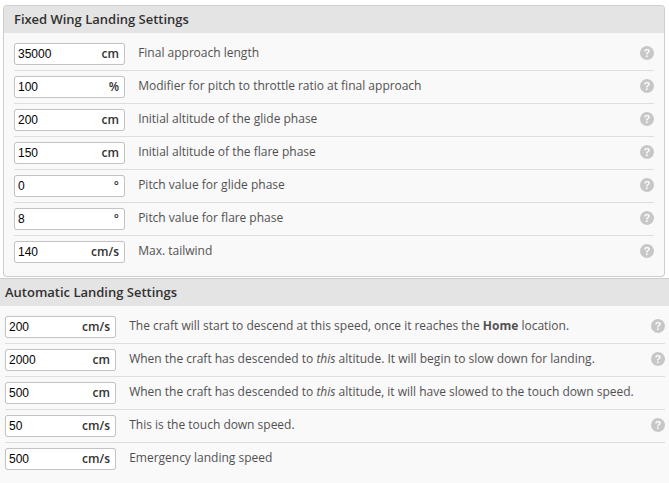
| Setting | Default | Range | What it does |
|---|---|---|---|
| nav_fw_land_approach_length | 35000 cm | 100 – 100000 | Length of the final approach from the final approach point to the site, and also the distance of the land point beyond it. |
| nav_fw_land_final_approach_pitch2throttle_mod | 100 % | 100 – 400 | Multiplies nav_fw_pitch2thr on final approach while the nose is down. At 200 % a pitch-to-throttle ratio of 15 acts as 30, cutting more throttle in the descent and slowing the plane. |
| nav_fw_land_glide_alt | 200 cm | 100 – 5000 | Height above the landing altitude at which the motor stops and the glide begins. |
| nav_fw_land_flare_alt | 150 cm | 0 – 10000 | Height above the landing altitude at which the flare begins. Only used with a rangefinder. |
| nav_fw_land_glide_pitch | 0° | -15 – 45 | Pitch held during the glide. |
| nav_fw_land_flare_pitch | 8° | -15 – 45 | Pitch held during the flare. |
| nav_fw_land_max_tailwind | 140 cm/s | 0 – 3000 | Wind below this speed is ignored and heading 1 is used as configured, see Choosing the landing direction. |
Related settings that are not landing-specific but shape the landing:
- nav_rth_allow_landing —
NEVER,ALWAYSorFS_ONLY; whether RTH ends in a landing at all. - nav_disarm_on_landing — disarm once the landing is detected.
- nav_fw_loiter_radius — the wind loiter circle, and through it the minimum base leg length.
- nav_fw_launch_land_abort_deadband — stick travel that aborts the landing, see Aborting a landing.
Tuning for a good landing
A landing is only as good as the navigation tune underneath it. Before you rely on autoland:
- Tune nav_fw_pitch2thr. The plane must hold its speed in navigation climbs and descents; if it slows down in a climb it will stall on the base leg, if it speeds up in a descent it will float past the site. Only then raise the final approach modifier to slow the plane down on final.
- Enable nav_fw_wp_tracking_accuracy. It keeps the plane on the extended centreline on final instead of merely heading for the site, so a crosswind cannot push the touchdown sideways. 2 m is a good value for most planes.
- Turns are coordinated. From INAV 10.0 the approach always uses coordinated
COORD_FLYBYturns, whatever nav_fw_wp_turn_mode is set to, so the base-to-final turn rolls out on the centreline, see Fixed Wing Waypoint Turns. nav_wp_radius no longer decides when the turns start; keep it at a sane value of 10 m or less so it does not cut the pattern short as a fallback. - Glide and flare need a trustworthy height. Without a rangefinder the glide starts on the estimated height above ground, which can be a few metres off. Give the glide altitude some margin and pick a glide pitch that brings the plane down safely with the motor off; there will be no flare. With a rangefinder the glide and flare heights are measured directly and the flare adds the final nose-up before touchdown.
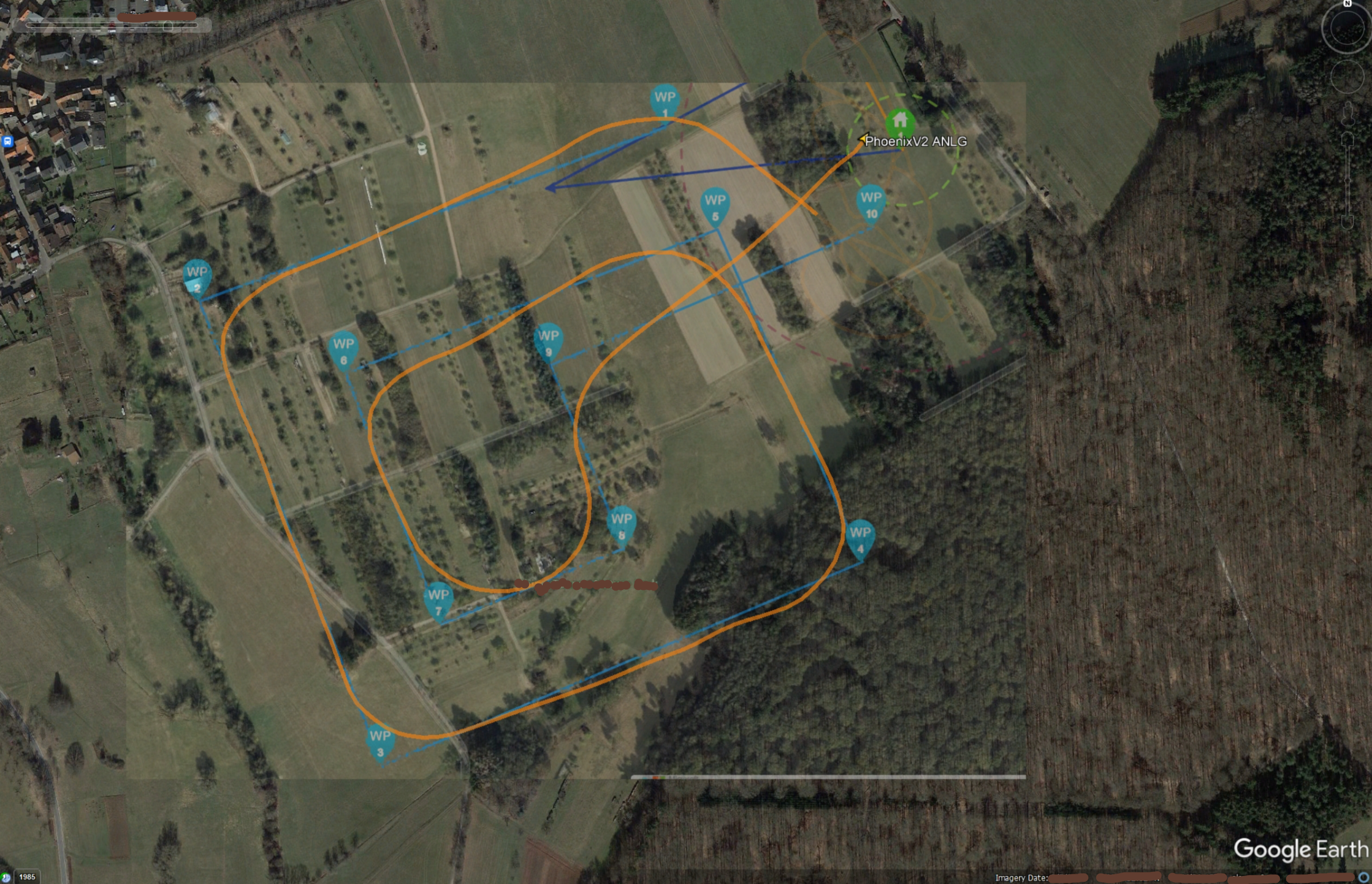
- Test the tune with a waypoint mission of 90° corners with shorter and shorter legs. A plane that can fly the mission below cleanly, with the leg between WP6 and WP7 as long as your approach length, is ready for autoland.
Landing at a waypoint
A mission can end with a LAND waypoint.
The landing site is the waypoint position; the approach parameters come from the landing settings of that mission, which the Configurator stores in the fwapproach slots 8 to 16, one per mission of a multi-mission setup, when you save the mission.
- The
LANDwaypoint must be the last waypoint of the mission. Reaching it ends the mission, so any waypoint after it would never be flown. - The waypoint altitude is flown on the way there, then the plane corrects to the approach altitude of the landing settings. The landing altitude also comes from the landing settings, not from the waypoint.
Aborting a landing
Move the roll or pitch stick beyond nav_fw_launch_land_abort_deadband and the landing is aborted, at any point from the climb to approach altitude down to the glide. The OSD reminds you of this while an abort is still possible. Once the flare has started the plane commits to the landing.
After an abort the plane continues the mission if it was landing at a waypoint, otherwise it returns to the RTH loiter over home. It will not try another automatic landing until RTH or the mission is engaged afresh.
If the position estimate is lost during the loiter or the approach, INAV switches to its emergency landing. Once gliding or flaring it keeps the runway heading and completes the landing.
Logic conditions
The landing phase is available to the programming framework as the flight operand FW Land State (ID 41), for example to deploy flaps or gear on the base leg.
| Value | Phase |
|---|---|
| 0 | Idle, no landing active |
| 1 | Loiter |
| 2 | Downwind |
| 3 | Base leg |
| 4 | Final approach |
| 5 | Glide |
| 6 | Flare |