VTX
Digital Systems
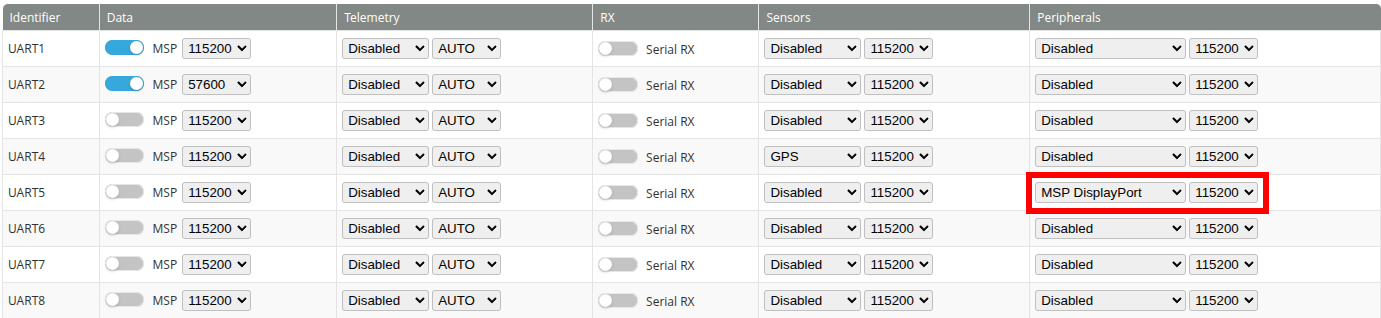
Digital systems get their information through MSP. To configure a digital system such as Caddx Walksnail, DJI, and Betafpv P1, go to the Ports tab and under Peripherals, select MSP Displayport. Ensure the UART connection from the FC to the VTX is connected to the selected port (UART 5 in the example above).
Analog VTX
INAV supports IRC Tramp and TBS SmartAudio protocols for controlling analog VTXs. To enable it, select IRC or TBS SmartAudio under Peripherals as seen in the image above. Once selected, the option to change the band and channel will appear in the Configuration Tab.
IRC Tramp 1G3SE Setup
To use the Matek 1G3SE with IRC Tramp. You will need to enter the CLI command set vtx_frequency_group = FREQUENCYGROUP_1G3. You must also make sure that the initial VTx settings in the configuration tab are in a valid range. They are:
vtx_band1 or 2vtx_channelbetween 1 and 8
Note: The frequencies required by the US version of the VTx are on vtx_band 2 (BAND B) only.
Power levels are:
125mW2200mW3800 mW
Matek 1G3SE frequency chart
| Band | 1 | 2 | 3 | 4 | 5 | 6 | 7 | 8 |
|---|---|---|---|---|---|---|---|---|
| A | 1080 | 1120 | 1160 | 1200 | 1240 | 1280 | 1320 | 1360 |
| B | 1080 | 1120 | 1160 | 1200 | 1258 | 1280 | 1320 | 1360 |
Team BlackSheep SmartAudio
If you have problems getting SmartAudio working. There are a couple of CLI parameters you can try changing to see if they help.
-
There is a workaround for early AKK VTx modules. This is enabled by default. You could try disabling this setting
vtx_smartaudio_early_akk_workaroundto OFF. -
If you are using softserial, you can try using the alternate method by setting
vtx_smartaudio_alternate_softserial_methodto OFF. -
If you are using TBS Sixty9 VTX you may consider to set count of stop bits to 1, using
set vtx_smartaudio_stopbits = 1