Navigation Mode Return to Home
Introduction
Return to Home (RTH) has quite a few settings, so would benefit from a page of it's own. RTH will attempt to bring copter/plane to the home position, or safehome if used. The home position is defined as a point where aircraft was first armed, by default. RTH will control both position and altitude. You will have to manually control altitude if your aircraft does not have an altitude sensor (barometer).
With default settings RTH will land immediately if you are closer than 5 meters from launch position. If further away it will make sure to have at least 10 meters of altitude. A plane will fly home at cruise throttle, then loiter or land, depending on settings. A copter will start going home at 3m/s, and land. It will disarm itself if so configured, otherwise you will have to manually disarm once on the ground.
Return to Home is activated by the NAV RTH flight mode.
RTH Altitudes
There are two altitudes that can be used with RTH: nav_rth_altitude and nav_rth_home_altitude.
nav_rth_altitude is used in conjunction with the RTH Altitude control modes to decide the altitude that the model returns home at. See below to see how the two are combined.
nav_rth_home_altitude sets the altitude that a plane will loiter at when it arrives at home. If above the nav_rth_home_altitude, the plane will start loitering, then loiter down to the home altitude. The default, 0, means that the feature is disabled. In which case the plane will loiter at the Actual RTH Altitude, or nav_rth_altitude if linear descent is used.
RTH Altitude control modes
RTH sequence can control altitude in several different ways, controlled by nav_rth_alt_mode and nav_rth_altitud (the altitude in centimetres) parameters.
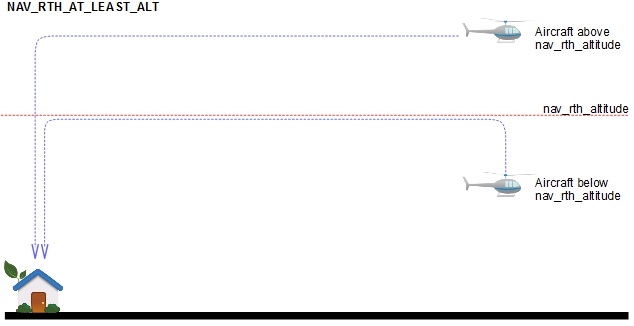
Default setting is NAV_RTH_AT_LEAST_ALT - climb to preconfigured altitude if below, stay at current altitude if above.
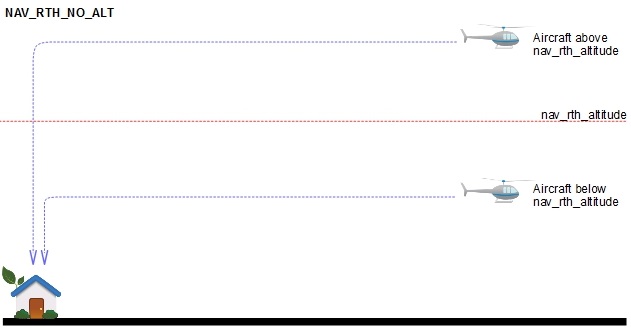
Maintain current altitude (NAV_RTH_NO_ALT)
- nav_rth_alt_mode = CURRENT
- nav_rth_altitude is ignored
The Actual RTH Altitude is the altitude that the model is currently flying at.
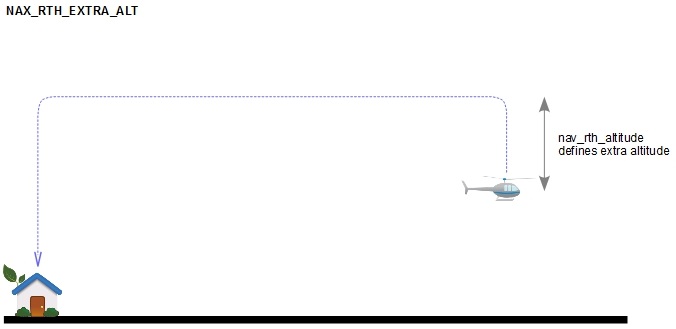
Maintain current altitude + predefined safety margin (NAV_RTH_EXTRA_ALT)
- nav_rth_alt_mode = EXTRA
- nav_rth_altitude defines extra altitude margin
The Actual RTH Altitude is the altitude that the model is currently flying at, plus the nav_rth_altitude.
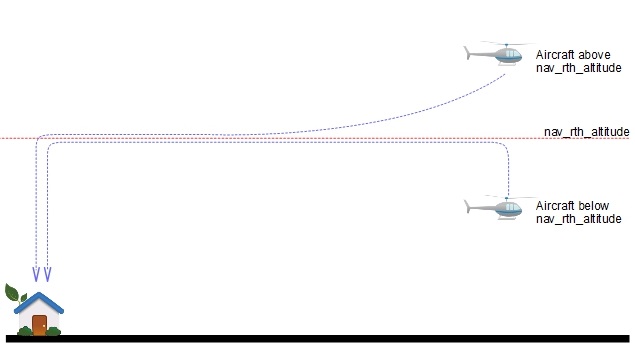
Predefined altitude (NAV_RTH_CONST_ALT)
- nav_rth_alt_mode = FIXED
- nav_rth_altitude defines exact RTH altitude above launch point.
If the model is below nav_rth_altitude it will climb to desired altitude prior to flying back home. If the model is above the desired altitude, it will turn and fly home and descend on the way. That defines the Actual RTH Altitude.
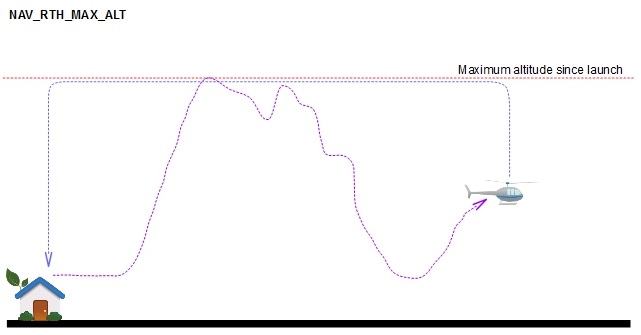
Maximum altitude since launch (NAV_RTH_MAX_ALT)
- nav_rth_alt_mode = MAX
- nav_rth_altitude is ignored
The Actual RTH Altitude is the highest altitude during the flight.
At least predefined altitude above launch point (NAV_RTH_AT_LEAST_ALT)
- nav_rth_alt_mode = AT_LEAST
- nav_rth_altitude defines the minimum RTH altitude above launch point.
If the aircraft is below nav_rth_altitude it will climb to desired altitude prior to flying back home. If the model is above the desired altitude, it will turn and fly home at the current altitude. This defines the Actual RTH Altitude.
Predefined altitude linear descent (NAV_RTH_AT_LEAST_ALT_LINEAR_DESCENT)
- nav_rth_alt_mode = AT_LEAST_LINEAR_DESCENT
- nav_rth_altitude defines minimum RTH altitude above launch point.
If the aircraft is below nav_rth_altitude it will climb to desired altitude prior to flying back home. If the model is above the desired altitude, it will turn and fly home, and descend on the way (on a linear straight line). This defines the Actual RTH Altitude. Aircraft will descend in a way that it'll reach the nav_rth_altitude altitude only when it reaches the home point. So aircraft can save energy by doing an easy descend on it's way back home.

Climb first
The nav_rth_climb_first option sets how the model will initiate the RTH.
Climb first with Multirotors
- If nav_rth_climb_first = OFF, the multirotor will turn to home, and immediately fly towards it, climbing on the way to the Actual RTH Altitude.
- If nav_rth_climb_first = ON, the multirotor hover and increase altitude. When it reaches the Actual RTH altitude, it will fly towards home.
Climb first with Fixed Wing
nav_rth_climb_first = OFF
The plane will turn towards home, and climb to the Actual RTH altitude on the homeward journey.

nav_rth_climb_first = ON
The plane climb to the Actual RTH altitude in the direction it is currently flying. Once the Actual RTH Altitude is reached, it will turn and fly towards home.

nav_rth_climb_first = ON_FW_SPIRAL
Feature available since iNav 3.0.
The plane climb in a loiter to the Actual RTH altitude. Once the Actual RTH Altitude is reached, it will turn and fly towards home.

Two stage climb first
Feature available since iNav 4.0
Climb first can be a pretty inefficient part of the RTH sequence. The problem is that you are using energy spiralling up to altitude, or worse, flying away from home while gaining height. However, turning off climb first may not be a valid option, depending on the flying environment. This setting gives pilots more options with climb first.
This feature can be set up in the CLI with the following commands:
- nav_rth_climb_first_stage_altitude: Allows you to set an altitude for the first climb stage. The default, 0, means the feature is disabled.
- nav_rth_climb_first_stage_mode: This setting is similar to nav_rth_mode, in that it lets you decide how you want to use the first climb stage altitude. Settings are AT_LEAST and EXTRA.
nav_rth_climb_first_stage_mode = AT_LEAST
This setting works in the same vein as the main RTH modes. Your target altitude for the first stage climb will be what you have set in nav_rth_climb_first_stage_altitude. If you are below the first climb stage altitude, the plane will climb to it. If not, it will turn to home. It will either directly fly home, or climb on the way home if your main RTH altitude target has not been reached. If the RTH Altitude is reached in the first stage, it will immediately turn towards home.
nav_rth_climb_first_stage_mode = EXTRA
Again, this setting works just like the main RTH modes. The target altitude for the first stage climb will be your current altitude plus the value you have set in nav_rth_climb_first_stage_altitude. If you are below the RTH Altitude, it will climb to the first climb stage altitude. If not, it will turn to home. The plane will either fly directly home, or climb on the way home if your RTH altitude target has not been reached. If the RTH Altitude is reached in the first stage, it will immediately turn towards home.
How does this work?
To be honest, pretty much as you expect it to. Once you select RTH, the model will start climbing (linear or spiral) up until the first stage target is met. Then it turns towards home and flies in that direction. If more altitude is needed to reach your target RTH altitude, it will climb on the way home. If the target altitude is met during the first climb stage, it will just fly home. Nice and simple, and much more energy efficient.


Other Relevant Settings
Altitude Control Override
It is possible to override the default RTH Altitude and Climb First settings during the initial RTH climb phase using the nav_rth_alt_control_override setting.